Skip to content

.NET-native backend-as-a-service · pre-v0.1

Write the schema. The backend is done.

One JSON descriptor holds your entities, access rules, hooks and webhooks. You write it, or your coding agent does: every refusal names the key at fault and, where it can, the fix. Apply it, and Alvo serves the whole backend.

no controllers · no migrations to write · no queue codedocker compose up, or AddAlvo() in your host

  1. you ask your agent

    “Build a help desk on Alvo: tickets with a title and a priority. Agents see only their own tickets. Post high-priority ones to our ops board.”

  2. it writes one file · help-desk.alvo.json

    "tickets": {  "audit": true,  "fields": { "title": …, "priority": … },  "rules": {    "list": "created_by == @user.id",    "create": "'agent' in @user.roles", …  },  "hooks": { "afterCreate": [{    "condition": "new.priority == 'high'",    "action": { "type": "webhook", "endpoint": "ops-board" } }] }}
  3. apply · revision 1

    CREATE TABLE "tickets" (…)-- and each rule compiled to a SQL predicate
  4. running

    A full REST API. A complete backend.

    • CRUD · batch · query/api/tickets
    • filter · sort · pagePostgREST syntax
    • access rulesin the SQL
    • multi-tenancyfrom the API key
    • hooks · webhooksvia an outbox
    • OpenAPI/scalar
    • admin dashboard/admin
    • revisionsroll back any time

coming after v0.1

  • automation
  • custom functions
  • sign-in providers
  • realtime
  • file storage
  • dynamic entities
Roadmap

An illustration. The descriptor lines are read from a descriptor the test suite applies.

Quick start · no clone

One compose file, two secrets, one command.

The published image over PostgreSQL, serving the vehicle-registry example it ships with. No clone and no .NET: Docker and one downloaded file.

  1. Download the compose file

    Terminal
    curl -fsSLO https://raw.githubusercontent.com/Burgyn/MMLib.Alvo/main/docker-compose.quickstart.yml
  2. Set the two secrets

    Terminal
    export ALVO_DEMO_KEY_SECRET="$(openssl rand -hex 16)"
    export ALVO_ADMIN_PASSWORD="$(openssl rand -hex 12)"

    The image ships no credential: the API key secret and the dashboard password both come from your shell. Keep ALVO_DEMO_KEY_SECRET exported for down as well.

  3. Start it

    Terminal
    docker compose -f docker-compose.quickstart.yml up --wait --wait-timeout 90

    --wait returns once /health/ready answers, which is after the descriptor is applied.

  4. Call it

    Terminal
    curl -sS localhost:8080/api/owners -H "X-Alvo-Api-Key: demo.$ALVO_DEMO_KEY_SECRET"
API reference
http://localhost:8080/scalar
Dashboard
http://localhost:8080/admin, as admin@alvo.local with $ALVO_ADMIN_PASSWORD
Image
ghcr.io/burgyn/alvo:edge, built from main for linux/amd64 and linux/arm64
Listens on
127.0.0.1:8080 only
Tear down
docker compose -f docker-compose.quickstart.yml down --volumes

ALVO_DESCRIPTOR switches to another example the image ships, or to your own file mounted read-only. Run your own descriptor

The full quick start

One descriptor

One entity in. A table, its routes and their rules out.

The vehicles entity of examples/vehicle-registry, the descriptor the quick start serves. It is checked against a JSON Schema and then semantically before anything is applied.

vehicles.alvo.json
"vehicles": {
"description": "A registered vehicle, owned by exactly one owner.",
"audit": true,
"fields": {
"vin": { "type": "string", "required": true, "unique": true, "maxLength": 17 },
"plate": {
"type": "string",
"required": true,
"unique": true,
"maxLength": 12,
"renamedFrom": "license_plate"
},
"make": { "type": "string", "required": true, "maxLength": 60 },
"model": { "type": "string", "required": true, "maxLength": 60 },
"year": { "type": "integer", "required": true },
"color": { "type": "string", "maxLength": 30 },
"owner_id": {
"type": "ref",
"entity": "owners",
"required": true,
"onDelete": "restrict"
}
},
"rules": {
"list": "'authenticated' in @user.roles",
"get": "'authenticated' in @user.roles",
"create": "'admin' in @user.roles",
"update": "'admin' in @user.roles || 'inspector' in @user.roles",
"delete": "'admin' in @user.roles"
},
"indexes": [
{ "fields": ["make", "model"] },
{ "fields": ["make", "id"] }
]
}
  • Routes
    GET POST
    /api/vehicles
    POST
    /api/vehicles/query
    GET PUT PATCH DELETE
    /api/vehicles/{id}
    POST PATCH DELETE
    /api/vehicles/batch
  • Schema

    Unique vin and plate, a foreign key to owners that refuses to orphan a vehicle, two composite indexes. renamedFrom renames the column and keeps every value.

  • Audit

    created_at, created_by, updated_at and updated_by on every row, and an ETag for If-Match.

  • Rules

    Each operation gated by its CEL rule. An operation without one is refused for everyone, administrators included.

  • Queries

    GET /api/vehicles?make=eq.Skoda&year=gte.2021&select=plate,make,model,year PostgREST's syntax, with its deviations documented. Read data

  • Contract

    Its own OpenAPI document at /openapi/v1.json and an API browser at /scalar.

In this build

What a team would otherwise write by hand.

Each is a line in the descriptor. What works today lists what this pre-v0.1 build runs, warns about and refuses.

  • Rules in the SQL

    "list": "created_by == @user.id || 'admin' in @user.roles"

    A list, get, update or delete rule becomes a parameterised predicate in the statement that touches the rows. A create is checked over the new row inside its transaction. No rule, no access.

    Access rules
  • Hooks that fail closed

    { "condition": "new.priority == 'high' && size(new.title) < 10", "action": { "reject": "A high-priority ticket needs a descriptive title." } }

    403 Forbiddennothing written

    A before-hook refuses or rewrites a write inside its transaction. A refusal, a function that fails or a value its field cannot hold rolls the write back.

    Validate and transform writes
  • Outbox, e-mail, webhooks

    "action": { "type": "webhook", "endpoint": "ops-board" }

    Every write commits its event through an outbox. After-hooks send e-mail and deliver webhooks, with retries. Deliveries are not signed yet.

    After-hooks and webhooks
  • Multi-tenancy

    "tenancy": { "enabled": true }

    The tenant comes from the API key, never from the request. Another tenant’s row answers 404, the same as a row that does not exist.

    Multi-tenancy
  • Filter, sort, page

    GET /api/vehicles?order=year.desc&limit=2&select=plate,year

    A PostgREST-shaped query string, keyset paging with after, and the same query as a JSON body.

    Read data
  • Computed fields, rollups

    "computed": "estimate_hours * hourly_rate"

    Derive a value from the row itself, or roll it up over related rows, without a client ever writing it.

    Computed fields and rollups
  • Revisions, rollback

    POST /management/projects/helpdesk/revisions/1/rollback

    200 OKthe rollback is revision 3

    Every applied descriptor is kept as a revision. Preview a change with ?dryRun=true, apply it with If-Match, roll back to any revision.

    Apply and evolve
  • Admin dashboard

    http://localhost:8080/admin

    Schema, rule and hook editors, a data browser, history and rollback, and a schema assistant that proposes changes for you to review.

    The admin dashboard

Admin dashboard

See the whole backend. Change it safely.

  • Edit entities, rules and hooks, with every expression checked as you type
  • Simulate a policy for any caller before a real request reaches it
  • Preview a change before you apply it; roll back from the history
  • Ask the schema assistant: it proposes a change, and you review and apply it
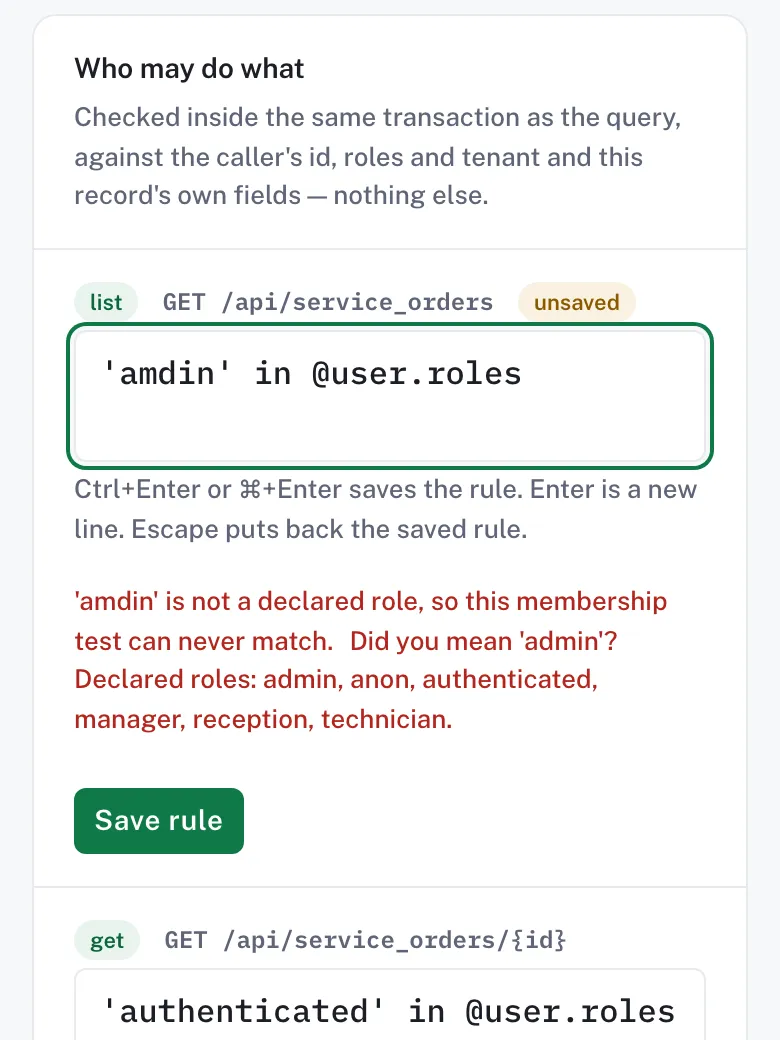
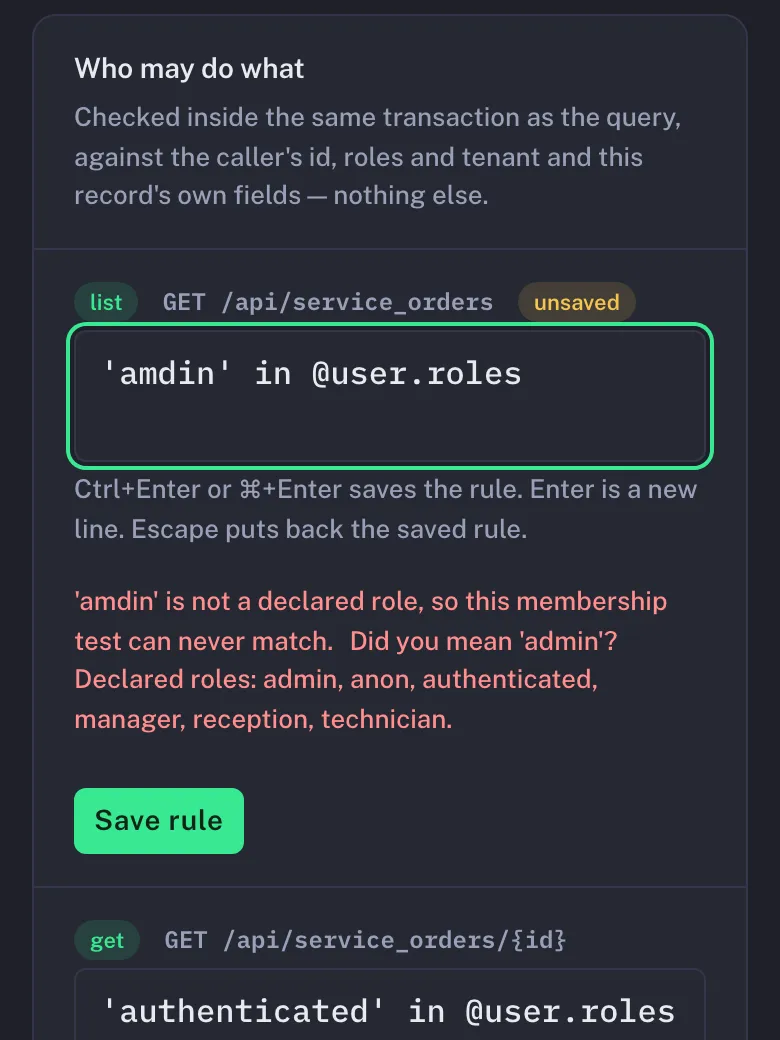
The dashboard's rules editor for the service_orders entity: the list rule has a typo, 'amdin' in @user.roles, and the live check under the box says 'amdin' is not a declared role and suggests 'admin'.The dashboard's rules editor for the service_orders entity: the list rule has a typo, 'amdin' in @user.roles, and the live check under the box says 'amdin' is not a declared role and suggests 'admin'.
The rules editor over the bike-workshop example: each rule is checked as you type, before anything is saved.

Two modes, one engine

Same descriptor. In a container, or inside your app.

The repository's embedded sample serves the same vehicle-registry descriptor the image does, and its tests check that both expose the same routes. Moving between them is carrying the file.

Standalone

ghcr.io/burgyn/alvo

Mount a descriptor; get the API, the dashboard at /admin, the Management API and /scalar. No .NET on the box. PostgreSQL or SQLite by configuration.

Your own descriptor
# uncomment in the compose file, under alvo:
# volumes:
# - ./my-backend.alvo.json:/alvo/descriptor.json:ro
ALVO_DESCRIPTOR=/alvo/descriptor.json docker compose -f docker-compose.quickstart.yml up --wait
Run your own descriptor

Embedded

ASP.NET CoreNot on NuGet yet

A library in your own host, set up in one Program.cs: your authentication, your endpoints beside Alvo's, your own C# functions callable from hooks. Today through project references or a local package feed.

Program.cs
using MMLib.Alvo.Auth;
var builder = WebApplication.CreateBuilder(args);
// Alvo's own API keys, from configuration (Alvo:Auth).
builder.Services.Configure<AlvoAuthOptions>(builder.Configuration.GetSection("Alvo:Auth"));
builder.Services.AddAlvo(alvo => alvo
.UseSqlite("Data Source=alvo.db")
.FromDescriptor("vehicles.alvo.json")
.AddDataApi(api => api.RoutePrefix = "/api/alvo"));
var app = builder.Build();
app.MapAlvoHealth();
app.MapAlvoDataApi();
app.Run();
Embed in ASP.NET Core

Agent-first

Your coding agent can drive it.

The whole backend is one file an agent can validate and dry-run, and every refusal is something it can act on.

First, give it the skills. The nine descriptor skills the dashboard’s assistant learns from are a Claude Code plugin; your agent loads each one when a task needs it. Another agent gets the same files from one script.

Claude Code
/plugin marketplace add Burgyn/MMLib.Alvo
/plugin install alvo@mmlib-alvo
  • Problem documents, RFC 9457. An invalid descriptor or record names the JSON pointer and, where it can, a fix, keyed by a stable type.
  • Dry runs and If-Match on the Management API: see the plan before anything is applied.
  • Idempotency-Key on every write: retry without writing twice.
  • A JSON Schema with a description on every key, so an editor checks the file as you or your agent type.
  • The docs as llms.txt and llms-full.txt.
For coding agents
A dry run catches a typocaptured · nothing applied

The descriptor it sends has one typo in a before-hook:

"mutate": {
"title": { "$cel": "trimm(new.title)" }
}
PUT /management/projects/helpdesk/descriptor?dryRun=true
X-Alvo-Api-Key: demo.$ALVO_DEMO_KEY_SECRET
If-Match: "1"

422 Unprocessable Entity

{
"type": "https://alvo.dev/errors/validation",
"violations": [
{
"pointer": "/entities/tickets/hooks/beforeCreate/0/action/mutate/title",
"code": "descriptor",
"message": "'trimm' is not a recognized function.",
"fixSuggestion": "Did you mean 'trim'? Known functions: contains, endsWith, int, lowerAscii, math.abs, math.ceil, math.floor, math.greatest, math.least, math.round, now, replace, size, startsWith, string, substring, timestamp, trim, upperAscii. A function a host registers with AddCelFunction exists only in that host; the standalone image and the CLI know the built-in ones only."
}
]
}

Run it on your machine, or hand it to your agent.

Alvo is pre-v0.1: the image runs from its edge tag, and no NuGet package or release is published yet. The descriptor format and the APIs may still change before v0.1.